If you have USB Floppy Emulator click here
To create hard drive setup floppy disk for OmniTurn CNC hard drive:
- Download HDSU336.EXE to your desk-top computer (must have floppy drive capability).
- Open hdsu336.exe (double-click on it, or right-click on it then click OPEN): A dialog box will open, explaining that OmniTurn Hard Drive Setup Disk will be created; click OK
- A second box will appear,
reminding you to insert floppy in drive A: of your desktop computer
- Put a floppy disk into drive A: of your desktop computer, then click OK to create hard drive setup disk.
To setup hard drive on your OmniTurn using floppy disk:
- Backup all your program files and tool offset files before starting!
- Put the setup disk you created (steps 1-4 above) in drive A: of your OmniTurn
- Power up your OmniTurn
- During power-up, repeatedly press the Del key to enter CMOS setup.
(For ZF-Micro motherboard press F2 key instead).
- At CMOS setup screen navigate to "Boot Sequence" and set to A: C:
(For ZF-Micro" motherboard, move "Removable" to top of list).
- Press F10 key to save and exit CMOS
- OmniTurn will reboot, and you will see this prompt:
WARNING All existing data on non-removable disk C: will be destroyed! -- Continue (Y/N)?
Press "Y" key to immediately begin formatting your OmniTurn hard drive. (If this is NOT what you want to do, remove the diskette and shut down your computer). After formatting, all files necessary for the standard Inverter drive system will be installed.
- When installation is complete, you will be prompted to choose VGA or Monochrome monitor. Press "V" or "M" key, then press Enter.
- When process is complete, set power OFF and remove diskette.
- Set power ON, then enter CMOS setup and change Boot Sequence back to C: A:
(For ZF-Micro, move "Hard drive" back to top of list).
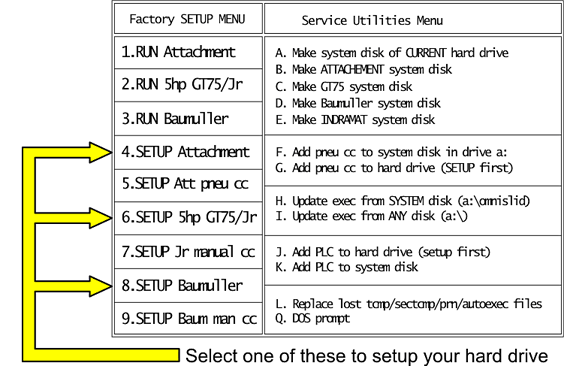
To setup your new hard drive (see menu below)
- Select #4 if you have an inverter drive on attachment (a retrofit on Hardinge®-type lathe)
- (NOTE: Select #5 if your lathe has collet closer lubrication)
- Select #6 if you have an inverter drive on GT-75 or GT-Jr
- Select #8 if you have Baumuller C-Axis drive
- After selecting appropriate setup for your OmniTurn, the control will reboot and display the OmniTurn CNC "splash" screen.
To write hard drive setup to thumb drive in USB Floppy Emulator:
NOTE: If you purchased your Floppy Emulator from OmniTurn, the update software is installed on the thumb drive that came with your emulator. Skip to Setup the Hard Drive below.
- Download IMAGES.EXE to your desk-top computer. Drag it to "Images" folder on Desktop. Create new folder if necessary.
- Open images.exe to extract all image files to the Images folder.
- Run USB Floppy Manager. (If not installed, Download and install this software).
- Write the 7-genhd.img file to disk 007 of the thumb drive. (Complete instructions here.)
- Set OmniTurn power off.
To setup the hard drive on your OmniTurn from USB Emulator:
- Backup all your program files and tool offset files before starting!
- Set OmniTurn power on.
- During power-up, repeatedly press the Del key to enter CMOS setup.
(For ZF-Micro motherboards press F2 key instead).
- At CMOS setup screen navigate to "Boot Sequence" and set to A: C:
(For ZF-Micro mb, move "Removable" to top of list).
- Set floppy emulator display to 007
- Press F10 key to save and exit CMOS
- OmniTurn will reboot, and you will see this prompt:
WARNING All existing data on non-removable disk C: will be destroyed! -- Continue (Y/N)?
Press "Y" key to immediately begin formatting your OmniTurn hard drive. (If this is NOT what you want to do, remove the diskette and shut down your computer). After formatting, all files necessary for the standard Inverter drive system will be installed.
- When installation is complete, you will be prompted to choose VGA or Monochrome monitor. Press "V" or "M" key, then press Enter.
- When process is complete, set power OFF.
- Set power ON, then enter CMOS setup and change Boot Sequence back to C: A:
(For ZF-Micro, move "Hard drive" back to top of list).
To setup your new hard drive (see menu below)
- Select the type of spindle drive on your OmniTurn:
Select #4 if you have an inverter drive on attachment (a retrofit on Hardinge®-type lathe)
Select #5 if your attachment has collet closer lubrication
Select #6 if you have an inverter drive on GT-75 or GT-Jr
Select #8 if you have Baumuller C-Axis drive
- After selecting appropriate setup for your OmniTurn, the control will reboot and display the OmniTurn CNC "splash" screen.