 The Oregon Coast to show picture; click anywhere else to hide picture (Apple IOS: refresh page).
NOTE: Click on brown textThe Oregon Coast to show picture; click anywhere else to hide picture (Apple IOS: refresh page).
The most common cause of this condition is loss of encoder signal, especially if it occurs right after a tool call. Verify that the progam is stopped at a g95 block, usually right after a tool call, or at any other block where slide movement depends on spindle speed, such as g33, g83, g96. If this is the case, then the issue is probably encoder‑related.
Tools are generally called to position using g00 (Rapid), or g94f300. These moves are in inches per minute (IPM). When the tool is in position, the mode is usually changed to inches per revolution (IPR), with a g95 block.
The g95 requires spindle encoder pulses for the slide to move, so if the encoder is bad or disconnected, the slide will not move; it is "waiting" for the spindle encoder to "tell it" how fast to move.
NOTE: If your OmniTurn has belt‑driven encoder (GT series: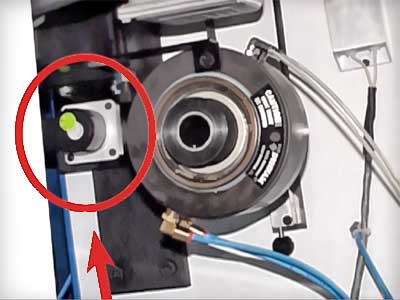 Belt‑driven encoder on GT pre‑2006; Attachments:
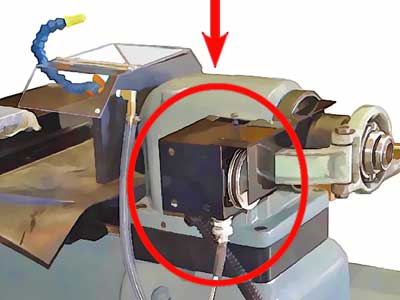 Belt‑driven encoder on Attachment pre‑2010), make sure the belt is not broken!
The first step is to turn down the spindle speed with the Spindle Override pot while the program is running, but the slide is not moving. If necessary, set Spindle Off/Auto switch to Off, and turn the spindle by hand. (Alternatively, you can write a short program to see if any slide movement occurs). If movement begins at a much slower spindle speed, then the issue is with either the spindle encoder or the "opto‑isolators" on the MC2 board.
Check the encoder cable. Whether the slide begins to move at much slower spindle speed or not, unplug the encoder cable, examine all the pins for any irregularity, then spray the connectors with contact cleaner or alcohol. Belt‑driven encoderBelt‑driven encoder on Attachment cables have connectors on both ends; direct‑drive encoders Direct‑drive encoder have connector only at CNC control.
Re‑plug the connnectors and run your program; if the program runs, you've fixed the issue by cleaning the connectors.
If movement begins at a much slower spindle speed, it is very difficult to determine if the issue is with the encoder or with the optos. Replace the encoder first, and if that doesn't fix the issue, replace the optos.
If movement does NOT begin, regardless of spindle speed it is necessary to troubleshoot by moving the spindle encoder to the z‑axis input as described directly below.
If no slide movement at any spindle speed, this proceedure will help determine if issue is with encoder or with opto‑isolators on MC2 card.


Turn the spindle slowly first one way, then the other less than 1/8 turn: the numbers should count up in one direction and count down in the other. NOTE: If you exceed 4000 counts, the servos will shut off.
(This method is alternative to turning down the Spindle Override pot while running your existing program, above).
(The "P" at the end of the g95 block is to tell the slide to start moving when the spindle "marker pulse" occurs).