Ctrl-H Diagnostic Screen Before Jogging
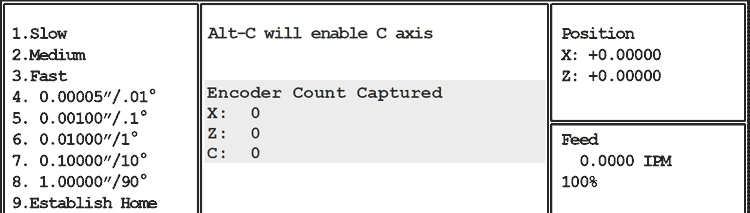
Use Ctrl-H if you have size-holding problems: your parts are not maintaining size (measurements are different part to part).
Ctrl-H Diagnostic Screen Before Jogging
Using Ctrl-H to diagnose repeatability problems:
Pressing Ctrl-H in Jog Mode enables display of the Encoder Count This test will quickly determine if the problem is electrical or mechanical. It is not necessary to load any special program, or to re-home the machine.
Select Jog 1 (Jog Slow) and jog the slide toward the nearest mark on the scale in the axis you’re having trouble with. When the “Position” counter passes 0.20000, the “Encoder Count Captured” number should change to 4000 (either plus or minus, depending on the direction you jogged).
Ctrl-H Diagnostic Screen After Jogging
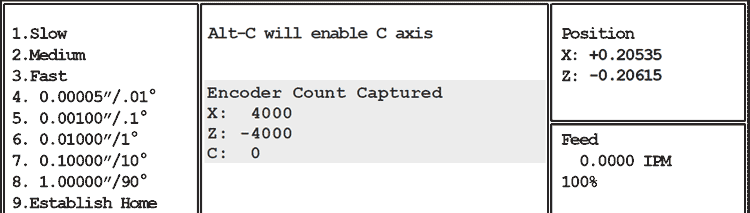
If the both axes read 4000 , the problem is mechanical: loose coupler, excess backlash, entire slide loose on ways, bad spindle, tooling, etc. Go to Mechanical Tests for help in determining the mechanical cause of the repeatablilty or size problem.
If either axis reads other than 4000, the problem could be a bad bad motor encoder, or some trouble on the motion card.
To narrow it down, you must load a test program that can run with the motor cables swapped. Controls ship with a program named smaltest on the harddrive. Smaltest only moves the slide one inch from home in X & Z, so it is safe to run with tooling on the slide. If you don't have smaltest, download a copy here.
Run five or ten cycles of smaltest, then do the Ctrl-H test again. Note which axis is not 4000.
Set the E-Stop to turn off servos, and swap the motor cables at the back of the control. Run five or ten cycles of smaltest and do Ctrl-H test again: If the same axis doesn’t read 4000, the problem is on the motion card. If that axis reads 4000, but the other axis is now not reading 4000, the problem is in the motor encoder.