Alt-I Diagnostic Screen
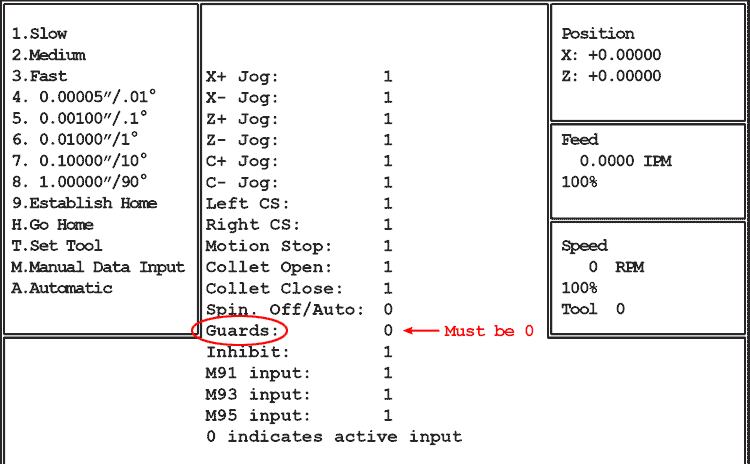
Use Alt-I to quickly determine if the states of the various switches and M-functions are being communicated to the motion control card (5AX card).
NOTE: For Guards, Inhibit, M91, M93, and M95 to display properly servos must be on.
Alt-I Diagnostic Screen
Pressing Alt-I in Jog Mode displays status of inputs.
Active inputs (on) are displayed as 0, inactive inputs (off) are shown as 1.
This diagnostic is helpful for quickly determining if the states of the various switches and M-functions are being communicated to the motion control card.
For example: if the machine won’t jog, you can quickly verify that the motion control card is reading the state of the Jog Stick by moving the Jog Stick and watching the 1's change to 0's.
Also, when door interlock switch (Guards, above) is open (1), the Motion Stop is shown as on (0) regardless of its actual condition.
NOTE: The Guards, Inhibit, M91, M93 and M95 inputs will remain at 1 unless the servos are on.
To cancel Alt-I press Alt-I again.
If the servos are on but the slide won’t jog, and “Guards” stays at 1 and Motion Stop stays at 0 regardless of whether the door is open or closed, press and hold the Alt key, then press G key (Alt-G), then press Esc. Note that Motion Stop will change to 1, but Guards will remain at 1.
Select a jog speed and attempt to jog: if the slide jogs with Alt-G active, the problem is a bad door switch or open connection in the door interlock string.
Alt-G is cancelled if Auto mode is selected.